From the read-only archive of the Wardley Mapping community forum (2018–2023). Category: Questions, Answers & Random posts. Posts are by their authors. Links to sites that moved or closed point to link notes.
orengolan ·
I watched this 10 min intro video by Wardley (Episode 1 : From Cloud to DevOps to Serverless in under 10 minutes using maps. - YouTube) and noticed how he quickly add components (with perfect position and sometime also with connectors). Can someone guide me how to do that? when i double click on the map i am able to create a component but I have to move it around manually and if i want a connector I have to edit the raw text on the left.
Mapkeep supports a similar type of effect using the idea of a Map Timeline: comment notes demo(link note). One of the reasons I built mapkeep.com(link note) was to quickly author maps in a browser. Its use is demonstrated in a series of these developer updates: Developer Update #1 - Mapkeep - YouTube
orengolan · · 1 like
interesting! thank you Tristan
bemosior ·
I’ll just pile on… I like to have a “menu” of things before I add relationships and position left to right for evolution, so my $0.02 is to make a list first. Users, needs, capabilities, etc. Then use that list like a menu.
When people make maps quickly, it’s often because they have already been working in the domain long enough to have the things in the domain memorized… so they don’t need the intermediary step.
I was not able to add connectors using the mouse so please let me know if that’s possible. Currently I just add the components by double clicking on the mouse, than I position the component using the mouse and I add the connectors manually using the a->b syntax.
I noticed that when I click on the ctrl button, all the nodes are highlighted. does anyone know if it serves any function?
Also i found a bug - hitting escape messes up the UI.
Just a few random observations and questions in an attempt to improve my workflow.
@orengolan
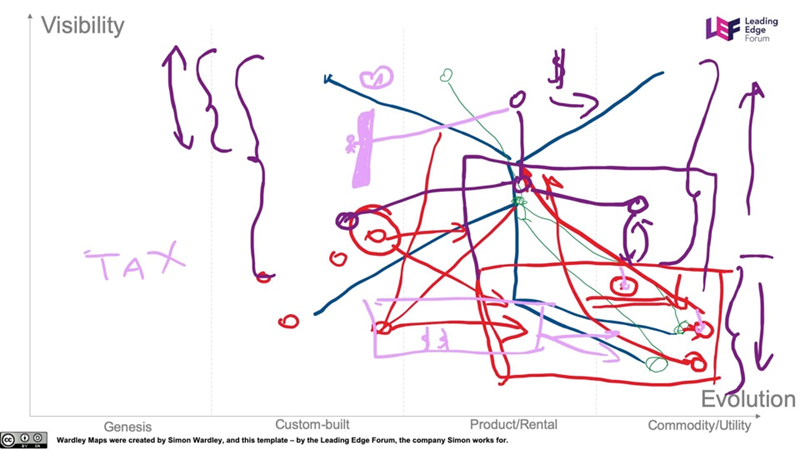
theoretically, Wardley Map is a Wardley Map, but in reality, there are two types: work maps and story maps.
Work Maps
Work maps are when the real work happen. They are created with exploration in mind, and you as the author actually do search for a good representation of the environment. This is how they can look like.
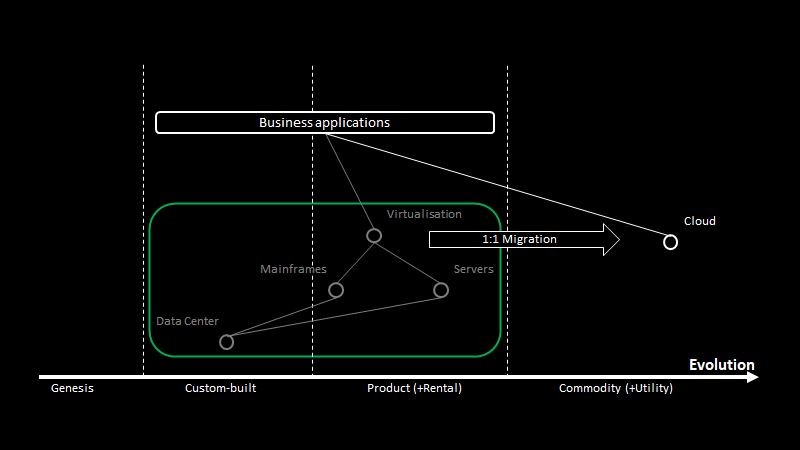
Story Maps
They are built a bit later with the purpose of tranferring understanding of the situation to the audience. They are much less collaborative in nature, and are built to elicit response. I have put together a blog post describing how to build them.
If you see a map of the second type being created live, you should assume that a lot of unadvertised prework has been already done.
orengolan · · 1 like
Thank you Chris. I started reading through your blog and it’s fantastic! I just watched the interview video with Joaquín Peña Fernández about managing your career with Wardley Maps and it’s incredible. Thanks again!
An interview with Joaquín Peña Fernández. Joaquín shows how he uses maps to manage his skills and how he applied Wardley Mapping to be more efficient at his work. If I were you, I would watch it twice (I did, in fact). Follow Joaquin on twitter or...